How to Build a Home Computer Network
An illustrated, practical guide to building a home network – VLANs, Wi-Fi, firewall, NAS, VPN and smart home – in the order you actually build it.
Works with any vendor – e.g. UniFi, TP-Link Omada, MikroTik or OPNsense for the network and Home Assistant, openHAB or Homey for the smart home.
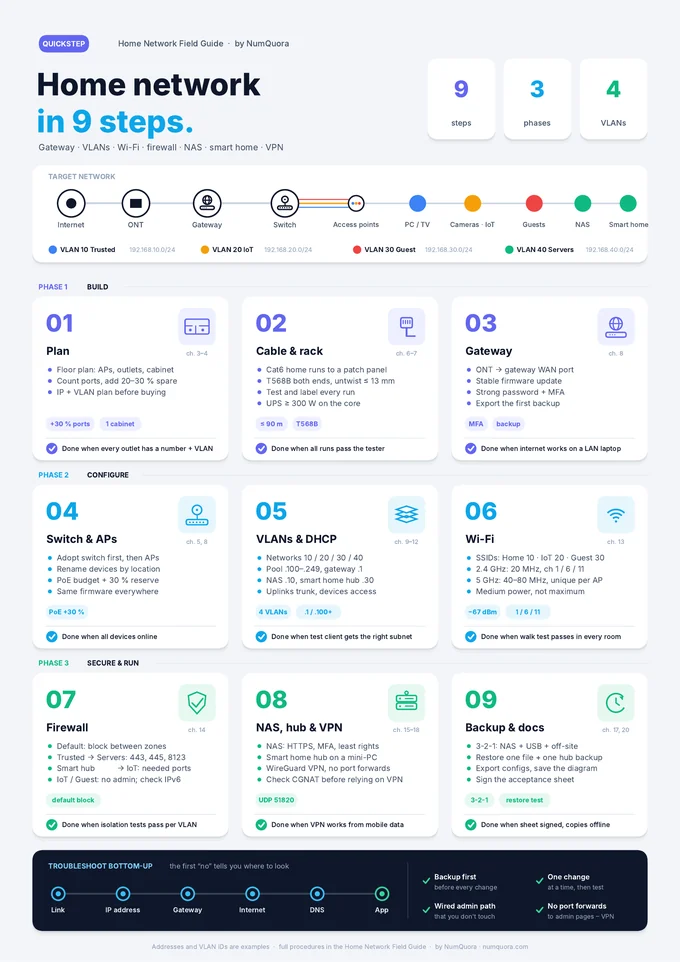
Contents – 20 chapters in 3 phases
Phase 1 Build
- Network fundamentals
- Reference architecture at a glance
- Planning and site survey
- The build order
- Choosing equipment
- Cabling, termination and testing
- Sizing PoE and UPS
Phase 2 Configure
- Initial setup of the gateway and controller
- IP addressing, DNS and DHCP
- VLAN segmentation
- Trunks, access ports and port profiles
- Moving to VLANs without locking yourself out
- Wi-Fi engineering and channel planning
Phase 3 Secure & run
- Firewall, security and how to prove it
- Secure remote access with a VPN
- NAS – network storage
- Backups and a real restore test
- Smart home hub and IoT
- Troubleshooting and rollout
- Updates and change management
Plus 7 appendices: IP and VLAN plan, network controller walkthrough, firewall matrix, NAS checklist, troubleshooting commands and an acceptance sheet.
Calculators for this guide:🔌 PoE Budget Calculator🔋 UPS Sizing Calculator🧭 Subnet & VLAN Planner
Download the free PDF
Light versionfor printing · 3,5 MBDark versionfor screens · 3,4 MBQuickStepwhole build on 1 page · 0,1 MB
29 pages · 20 chapters · 7 appendices · QuickStep (dark)